


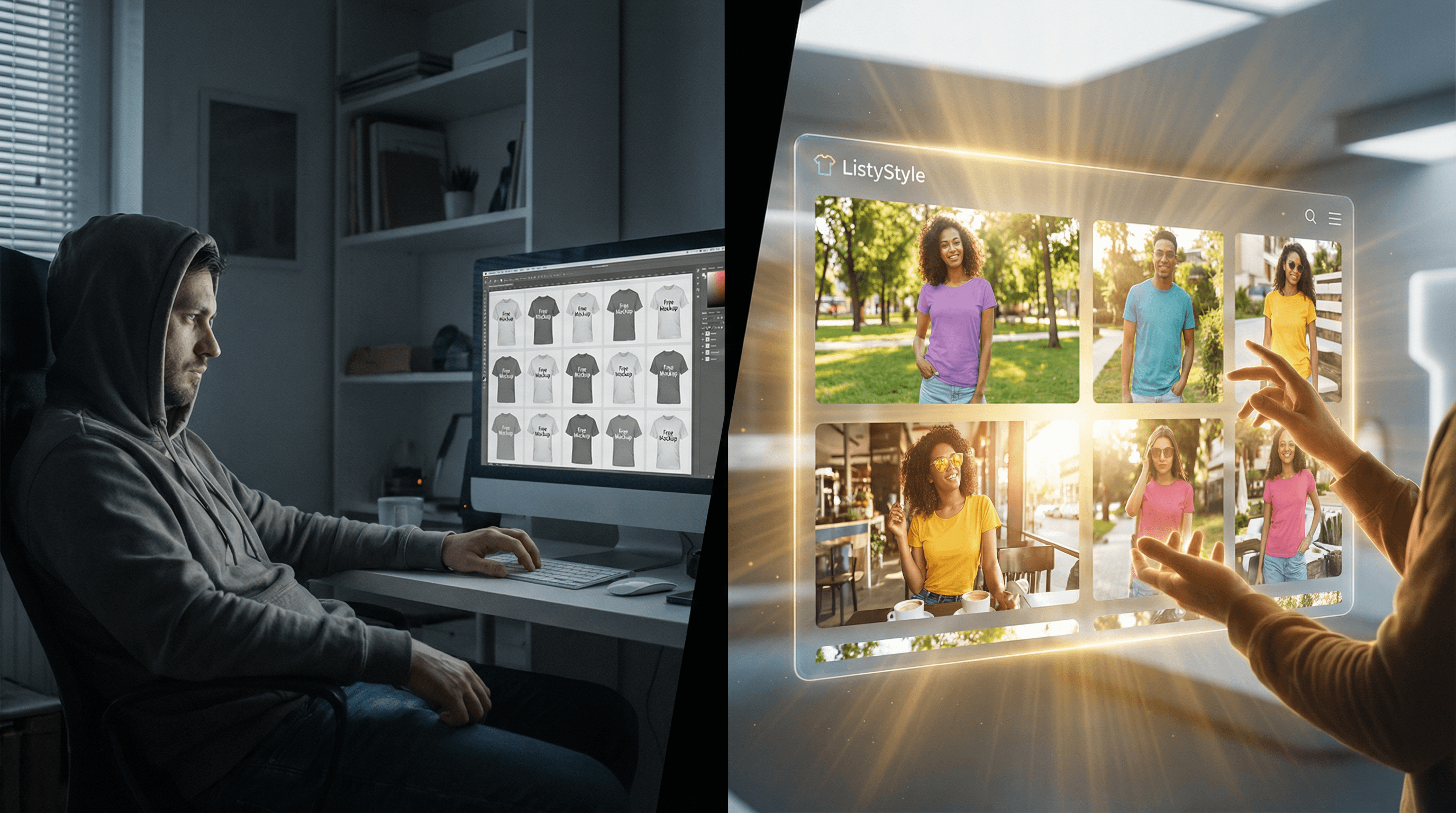
The difference between a browser and a buyer often comes down to a single image. In the crowded world of Etsy Print-on-Demand (POD), your main thumbnail is your storefront window. If it looks professional, trustworthy, and appealing, you get the click. If it looks like a generic digital paste-up, you get scrolled past.
For new sellers, the quest for the perfect “free t-shirt mockup” is a rite of passage. You want to showcase your designs beautifully without eating into your margins. While free resources exist, relying on them exclusively can sometimes cost you more in time and brand reputation than you realize. This guide will walk you through the best free resources available, explain the hidden traps of the “free” approach, and introduce an automated workflow that balances cost-efficiency with premium quality.
Why Are High-Quality Mockups Critical for Etsy Sales?
Before diving into the sources, it is vital to understand the “why.” A mockup does more than just show the design; it sells a feeling. When a customer sees a t-shirt on a hanger, they see a piece of clothing. When they see a t-shirt worn by a smiling model in a sunny park, they see a lifestyle they want to be part of.
Internal market analysis indicates that listings featuring high-quality, human-centric lifestyle mockups can see a Click-Through Rate (CTR) up to 40% higher than those using standard flat lays or digital-only previews.
The Trust Factor In the POD industry, buyers know they are purchasing a custom item. A realistic mockup reassures them that the print quality will be good and the placement will look natural. Poorly edited free mockups, where the design looks like a floating sticker, destroy this trust immediately.
What Are the Best Sources for Free T-Shirt Mockups?
If you are just starting and have more time than budget, there are several reputable places to find free assets. Here is a breakdown of the top contenders:
Placeit (Free Section): Often considered the gold standard for easy mockups, Placeit has a limited free section.
Pros: Easy to use, browser-based, no software needed.
Cons: The free library is small and heavily overused. Your “unique” main image might appear on five other competitor listings.
Canva: A favorite among creators, Canva offers a “Smartmockups” feature.
Pros: Integrated into a tool you likely already use.
Cons: Customization is limited. The displacement maps (how the design wraps around wrinkles) are often less realistic than professional tools, leading to a “flat” look.
Pexels & Unsplash: These stock photo sites offer high-resolution photos of people wearing blank t-shirts.
Pros: Completely free, high quality, real photography.
Cons: High Manual Labor. You must have image editing software (like Photoshop or GIMP) to manually place your design, adjust the perspective, and blend the colors. This is not clear-cut “automation.”
Freepik: A massive library of PSD (Photoshop) files.
Pros: Professional studio lighting and high resolution.
Cons: Requires Adobe Photoshop (a paid subscription) and technical skill to use “Smart Objects.”
The Hidden Trap of “Free” Workflows
Meet Sarah. She is a talented illustrator who just opened her Etsy shop. She wants to keep costs low, so she decides to use only free mockups from Pexels.
Her Goal: Launch 20 new t-shirt designs this weekend.
The Manual Grind: She downloads 20 stock photos. She opens GIMP (free software) because she doesn’t have Photoshop. She spends 20 minutes on the first image, trying to make the design look natural on the model’s wrinkled shirt. It looks “okay,” but not great. She repeats this process.
The Trap: By Sunday night, she has only finished 5 listings. She is exhausted, her wrist hurts, and her store looks inconsistent because every photo has different lighting. Worse, she hasn’t spent a single minute on Etsy SEO guide or product research.
The Reality Check: Sarah “saved” money on mockups but lost an entire weekend of business growth.
How Can I Create Professional Mockups Automatically?
Smart entrepreneurs value their time as their most precious currency. The solution isn’t just finding a free JPG; it’s finding a system that generates premium visuals for you. This is where Listybox changes the game, offering a suite of tools that function as your personal creative agency.
ListyStyle: The Lifestyle Image Generator Instead of searching for a template, imagine an AI that creates one for you. ListyStyle mockup creator is a revolutionary feature that uses artificial intelligence to generate photorealistic lifestyle images.
How it works: You select your product and design. The AI analyzes the context and generates high-resolution images of models wearing your shirt in various settings - cafes, parks, studios.
The Benefit: You get unique visuals that no other seller has. You generate hundreds of variations in the time it takes Sarah to open Photoshop.
Background Remover: Clean and Professional Often, your design file might have a white background that ruins the mockup on a colored shirt. Buying tools like Remove.bg adds up. Listybox includes a powerful Background Remover tool directly in your dashboard.
- The Benefit: One click removes the background, saving you subscription fees for external tools and streamlining your workflow.
Placement Editor: The Art Director’s Touch One major complaint with free generators is lack of control. The design sits too low or too high. With the Placement Editor, you have total control.
- The Benefit: Adjust the size and position of your artwork once, and apply those settings across hundreds of products instantly. It’s the precision of Photoshop with the speed of automation.
Start your free trial - no credit card required and see how fast you can transform your design library.
How Do I Choose the Right Mockup for My Brand?
Whether you choose a free download or ListyStyle mockup creator, consistency is key. 1. Know Your Niche: Selling funny dad jokes? Use models that look like dads, not teenage skaters. Selling boho art? Use natural lighting and outdoor settings. 2. Color Matters: Ensure your mockup background doesn’t clash with your shirt color. Contrast helps the product pop. 3. Video is King: Etsy loves video. Creating manual videos is hard, but automation tools can animate your mockups to grab attention in search results.
Overwhelmed by the Setup? Let Us Help.
Does all of this feel overwhelming? You don’t have to start from scratch. With Listybox Store Setup, our expert team sets up your Etsy store, lists your first 10 products, and optimizes everything for SEO. This service is included FREE with annual Starter and Professional plans! It’s the perfect way to skip the technical headaches and jump straight to selling.
Conclusion: Value Time Over “Free”
Using free t-shirt mockups is a valid strategy when you have zero budget and infinite time. But as soon as you want to scale, the manual friction becomes a wall. By leveraging intelligent tools like Listybox, you don’t just get better images; you reclaim the hours you need to build your empire.
Don’t let manual editing hold you back. Start Listybox now and turn your designs into a professional brand today.
Put this into practice in your shop.
Every step from design to live listing, on one platform. Start on the free plan.
No credit card required.
Related posts
Want to go deeper? Read our in-depth Etsy guides · Browse 100 Etsy niche guides